
Training in the Browser: The Rise of Interactive 3D Learning Modules That Actually Work
Not every team has VR headsets.
Not every learner is on the factory floor.
Not every environment supports immersive 3D hardware.
But every workforce still needs training that sticks.
In an era of global teams, remote access, cost constraints, and variable tech stacks, the demand for browser-based interactive training modules has grown rapidly – especially those built using technologies like WebGL and HTML5.
At Spatio, we’ve seen firsthand how 3D browser-based simulations, when thoughtfully designed, can rival VR in engagement, outperform slideshows in retention, and scale faster than both.
Here’s when they make sense, what they’re best used for, and how to design them for real-world impact.
When Are Browser-Based Training Modules the Right Fit?
Not every problem needs a headset.
While immersive VR training has redefined how hands-on SOPs are taught, browser-based modules offer a practical, lightweight alternative in several situations:
When Accessibility Matters
- Teams without access to VR devices or controlled spaces
- Remote staff or distributed field teams
- BYOD (Bring Your Own Device) learning environments
When Cost and Speed Are Priorities
- Faster content development and iteration
- No hardware dependency or shipping logistics
- Scales across regions with zero physical setup
When the Learning Outcome Is Procedural, Not Spatial
- SOP walkthroughs
- Equipment interface training
- Safety decision-making simulations
- Soft skills with branching scenarios
In short, browser-based training is ideal when reach, repeatability, and retention are the focus – without needing 3D immersion.
Common Use Cases for Web-Based Interactive Modules
We’ve built and deployed browser-based training for clients across industries. The use cases are broad, but the logic is consistent: build muscle memory in decision-making, not just motion.
1. Digital SOP Training
Step-by-step simulations of standard operating procedures for assembly, inspection, or safety
2. Equipment Familiarization
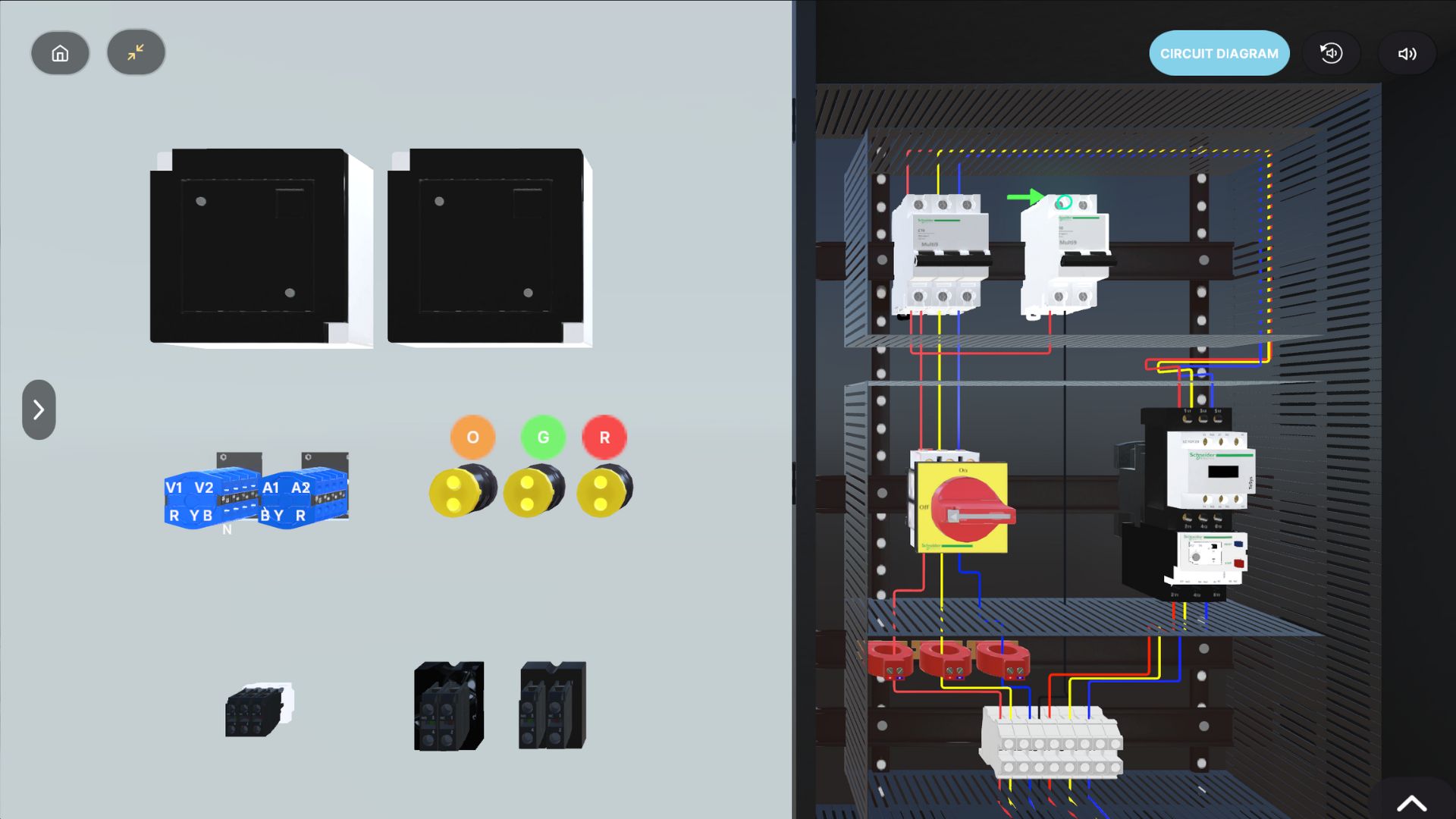
Train users on buttons, interfaces, and panel navigation through 3D schematics with hover and click interactivity.
3. Emergency Response Simulations
Decision-tree based scenarios: “What would you do next?” style modules that train instinct.
4. Soft Skills and HR Training
Gamified compliance training, onboarding journeys, and behavioral roleplay with consequences and branching logic.
5. LMS-Embedded Microlearning
Short, task-specific training clips that can be embedded directly into existing Learning Management Systems.
What Makes Browser-Based Training Actually Effective?
Let’s face it – a lot of 3D training modules feel like glorified PowerPoints.
To be genuinely effective, you need to move from passive delivery to active learning.
Here’s how:
1. Gamify, But with Purpose
Add points, progress bars, or time challenges – but only if they reinforce the learning outcome. Introduce scenario-based scoring: e.g., safety violations, response time, or SOP compliance.
Gamification done right improves attention, retention, and repetition.
2. Use Second-Person Perspective
“You are the operator. You see the alarm flashing. What do you do next?”
This second-person narrative makes the learner the protagonist, transforming instruction into simulation – even in 3D.
It’s especially effective for: Safety drills, Role-based decisions, HR and compliance training.
3. Design for Repeatability
Good training isn’t a one-and-done. In 3D interactive training, it is always important to include Instant feedback after wrong decisions, Options to retry sections without penalty and dynamic pathways that change on replays.
This drives exploration and self-correction – the foundation of experiential learning.
4. Optimize for Performance and Devices
When considering browser based modules, build in WebGL/HTML5 for fast load times and broad compatibility. Ensure mobile responsiveness for on-the-go access and most importantly, include an offline caching option (where needed) for field or low-bandwidth locations
What works on one browser should work on all.
5. Track What Matters
All interactions and usage must be tracked. Ensure your modules are LMS-compatible and return Completion rates, decision points and accuracy, time to complete and re-attempt patterns.
Data closes the loop between training effort and workforce performance.
Immersive Isn’t Always 3D
The goal isn’t to impress learners.
The goal is to equip them – confidently, repeatably, and at scale.
Browser-based interactive training modules are an increasingly important part of the enterprise L&D toolkit. They’re:
- Accessible
- Measurable
- Easy to update
- Built for distributed teams
- And surprisingly immersive – when designed with the learner at the center
At Spatio, we build both browser-based and VR training solutions – and we often recommend a hybrid model: use 3D modules for knowledge, and VR for muscle memory. Because in the end, the best training is the one that works – wherever your workforce happens to be.
Need to know more about Interactive Training on Browsers?